> For the complete documentation index, see [llms.txt](https://docs.creativeconners.com/docs/llms.txt). Markdown versions of documentation pages are available by appending `.md` to page URLs; this page is available as [Markdown](https://docs.creativeconners.com/docs/showstopper/control-connection/making-the-connections.md).
# Making The connections
## Recommended Wiring
### Showstopper 4 Accessory Cable
The cable must have at least 6 twisted pairs (12 conductors) of 20AWG (20/6 STP). Here are a few purchasing options:
* [Quabbin PLTC3-20-8S-1](https://www.automationdirect.com/adc/shopping/catalog/bulk_wire_-a-_cable/process_-a-_instrumentation_cable/pltc3-20-8s-1)
* [Igus CF211-05-06-02](https://www.igus.com/product/1073?artNr=CF211-05-06-02)
* [LAPP 302006STP](https://www.lapp.com/en_US/us/unitronic-300-stp/p/302006STP)
* [MultiCable L8020-6PS](https://www.multicable.com/Customer-Content/www/products/Files/PDF_SPECS/Multi-pair_Electronic_Cable_Unshielded_PVC_Insulated___Jacketed.pdf)
### Network Cable
Each network port requires a dedicated, home run Ethernet connection. Almost any CAT5E or CAT6+ solid conductor cable is acceptable. A foil shield is not necessary, but is also acceptable.
Here are two options:
* Belden 1585A or similar
* Belden 4812 or similar
* Belden 4813 or similar
* Belden 2413F or similar
## PCB Pass Through vs Terminated
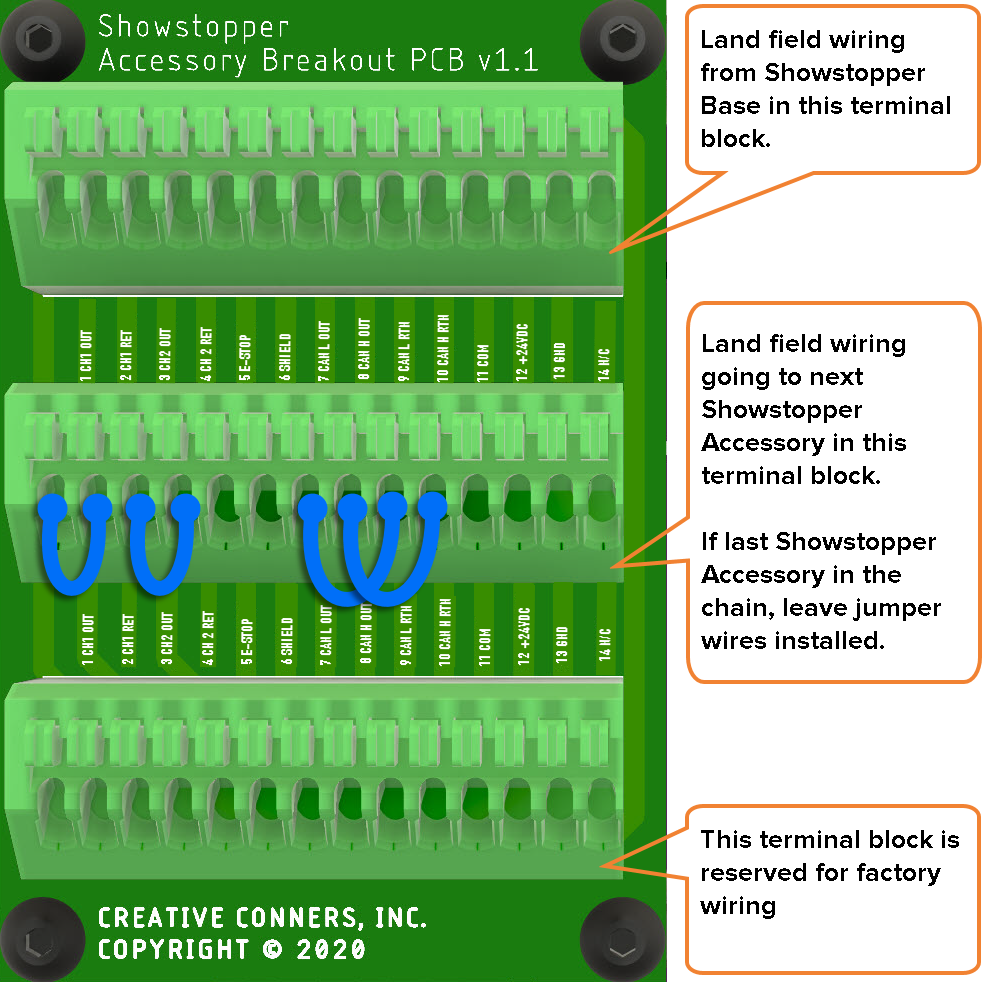
Control Connections are made so that you can easily expand your automation system. Each faceplate can be wired as either a “home run” back to the Showstopper Accessory output, or it can be wired in series with other Control Connections or Showstopper Remote E-Stops.
All three terminal blocks, top (J1), middle (J2) and bottom (J3), are electrically bonded, so it does not make a difference which ones are used as inputs versus outputs. Our recommended termination pattern is as follows:
J1: Input from previous connection or Showstopper Accessory output
J2: Output to next connection OR jumpers for final termination
J3: Factory installed Accessory Socket
### Jumper Connections
If the Control Connection is NOT being used as a pass through, there are four (4) jumper wires that need to be in place to allow the E-Stop to function properly.
Pin 1 → Pin 2
Pin 3 → Pin 4
Pin 7 → Pin 9
Pin 8 → Pin 10
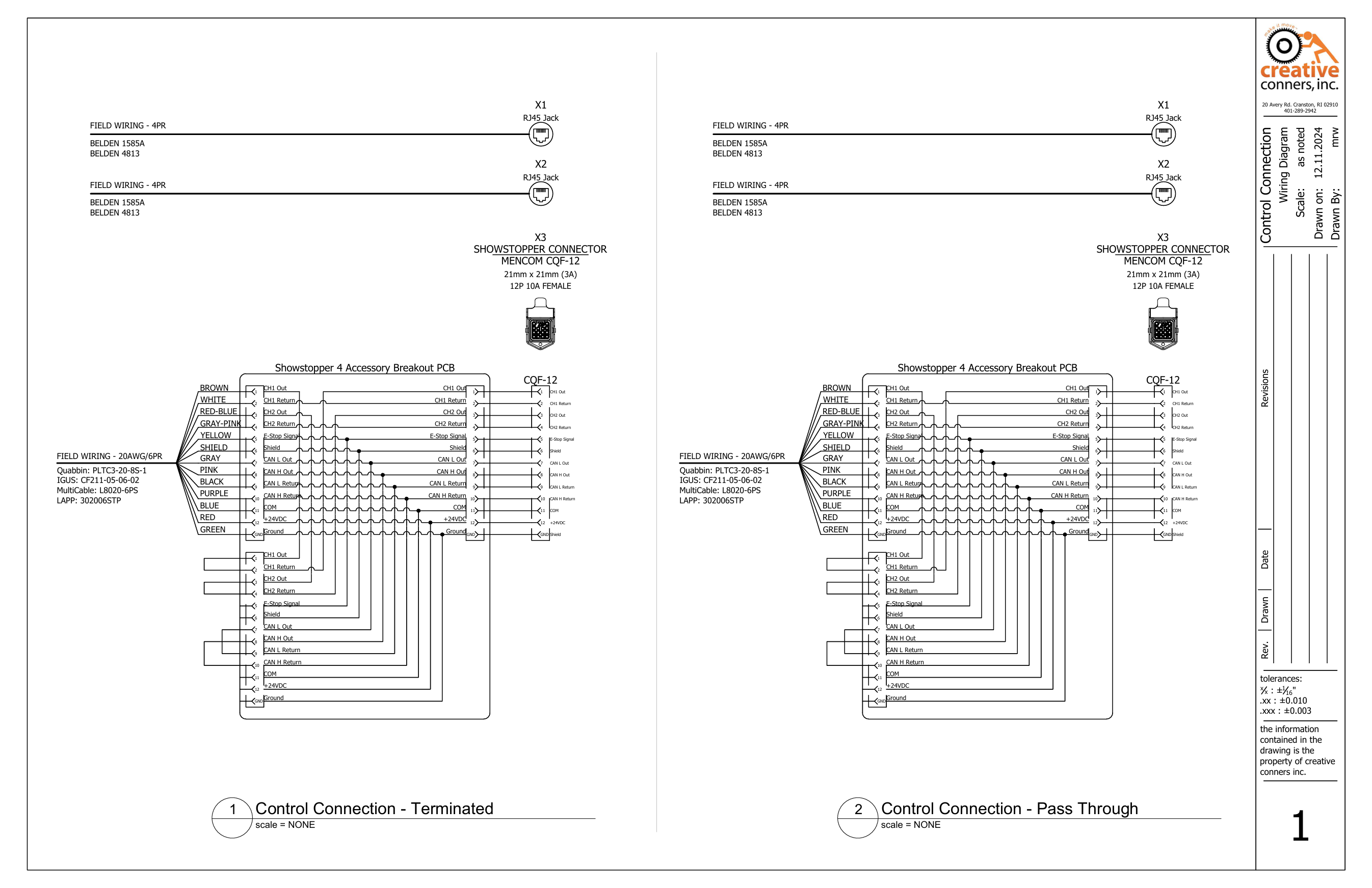
## PCB Wiring Diagram
---
# Agent Instructions
This documentation is published with GitBook. GitBook is the documentation platform designed so that both humans and AI agents can read, navigate, and reason over technical content effectively. Learn more at gitbook.com.
## Querying This Documentation
If you need additional information that is not directly available in this page, you can query the documentation by asking a question.
Perform an HTTP GET request on the following URL with the `ask` and `goal` query parameters:
```
GET https://docs.creativeconners.com/docs/showstopper/control-connection/making-the-connections.md?ask=&goal=
```
`ask` is the immediate question: it should be specific, self-contained, and written in natural language.
`goal` is what the user is ultimately trying to achieve, the reason they need the answer. Sharing it helps GitBook give you a better, more relevant answer. A goal is most helpful when it describes the outcome the user wants rather than restating the question. For example, with `ask=how do I create an API token`, a goal like `automate deployments from our CI pipeline` lets GitBook tailor the answer to that use case.
The response will contain a direct answer to the question and relevant excerpts and sources from the documentation.
Use this mechanism when the answer is not explicitly present in the current page, you need clarification or additional context, or you want to retrieve related documentation sections.